Other Ways to Support Us.
Kroger Community Rewards
About The Program
Turn everyday shopping into consistent support for our organization. When you link your Kroger Plus Card, a percentage of eligible purchases is donated at no extra cost to you!
Easy Enrollment
1. Create a digital account if you don't already have one.
2. Link your Card to our organization.
3. Our organization earns.
Please see the other tabs for exact instructions on how to enroll via the mobile app or the Kroger website.
No Extra Cost
After linking your card, any transactions moving forward using the Shopper’s Card number associated with your digital account will be applied to the program, at no added cost to you. Kroger donates annually to participating organizations based on your percentage of spending as it relates to the total spending associated with all participating Kroger Community Rewards organizations.
Support
If you have any questions, please contact Kroger's Customer Service Center .
How to Enroll
Please follow these steps to link your card to our organization via the Kroger app on Android:
- Go to the Kroger app and sign in or create an account.
- Open the menu and scroll down to Community Rewards.
- Search for our organization by name — The SoberSoft Network — or our ID, KB283.
- Select our organization and click Enroll.
- Use your Kroger Plus Card or Alt ID at checkout—your purchases now support our organization! Thank you!
How to Enroll
Please follow these steps to link your card to our organization via the Kroger app on Apple/iOS/iPhone:
- Go to the Kroger app and sign in or create an account.
- Open the menu and scroll down to Community Rewards.
- Search for our organization by name — The SoberSoft Network — or our ID, KB283.
- Select our organization and click Enroll.
- Use your Kroger Plus Card or Alt ID at checkout—your purchases now support our organization! Thank you!
How to Enroll
If on a desktop/laptop computer, please follow these steps:
- If you already have a Kroger account, sign in. If you do not have an account, create one.
- Navigate to My Account > Community Rewards.
- Search for our organization by name — The SoberSoft Network — or our ID, KB283.
- Select our organization and click Enroll.
- Use your Kroger Plus Card or Alt ID at checkout—your purchases now support our organization! Thank you!

Walmart Spark Good Round Up
About The Program
Turn your Walmart.com purchases into ongoing support for our organization through Spark Good Round Up. When you select our organization and enable Round Up, your eligible online purchases are rounded up to the nearest dollar at checkout, and the spare change is donated to help support our mission.
Easy Setup
1. Sign in or create a Walmart account.
2. Go to Giving & Impact.
3. Search for and select The SoberSoft Network.
4. Turn on Round up to donate.
Please see the other tabs for exact steps using the Walmart app or website.
Small Change, Big Impact
Spark Good Round Up automatically rounds eligible Walmart.com purchases up to the nearest dollar at checkout and donates the difference to your selected nonprofit. It’s an easy way to support our work while doing your normal shopping.
Support
If you have any questions, please visit Walmart’s Help Center or the Spark Good page .
How to Enroll
Please follow these steps to support us through the Walmart app on Android using Spark Good Round Up:
- Go to the Walmart app and sign in or create an account.
- Click Account in the app, then scroll down to Giving & Impact.
- Search for our organization by name — The SoberSoft Network.
- Select our organization and turn on Round up to donate.
- Shop in the Walmart app or on Walmart.com while signed in. Eligible purchases can be rounded up to the nearest dollar at checkout to support our organization.
How to Enroll
Please follow these steps to support us through the Walmart app on Apple/iOS/iPhone using Spark Good Round Up:
- Go to the Walmart app and sign in or create an account.
- Click Account in the app, then scroll down to Giving & Impact.
- Search for our organization by name — The SoberSoft Network.
- Select our organization and turn on Round up to donate.
- Shop in the Walmart app or on Walmart.com while signed in. Eligible purchases can be rounded up to the nearest dollar at checkout to support our organization.
How to Enroll
If on a desktop/laptop computer, please follow these steps:
- Go to Walmart Spark Good and sign in to your Walmart account.
- Search for our organization by name — The SoberSoft Network.
- Open our organization profile.
- Choose Select this charity.
- Shop in the Walmart app or on Walmart.com while signed in. Eligible purchases can be rounded up to the nearest dollar at checkout to support our organization.

Facebook Fundraising
Create a Facebook Fundraiser
You can quickly create a Facebook fundraiser to support The SoberSoft Network. Fundraisers allow you to invite friends, share updates, and raise money directly inside Facebook.
How It Works
Facebook fundraisers let you raise money on our behalf by sharing a story, setting a goal, and inviting friends to donate. It's completely free and takes less than a minute to set up.
Official Fundraiser Link
Facebook provides us with a direct link that takes you straight to the fundraiser creation page. Must be on a desktop/laptop computer. Does not work on mobile devices.
Create FundraiserWhat You’ll Need
• A Facebook account
• A short message explaining why this cause matters to you
• Optional: A profile photo or personal image for your fundraiser
#Nonprofit #Charity #GiveBack #MakeADifference #ChangeMakers #SocialImpact #CommunityFirst #DoGood #ActOfKindness #Volunteer MISSION-FOCUSED
#MentalHealthMatters #RecoverySupport #CommunityWellness #HopeAndHealing #EmpowerChange #SupportEachOther #EndTheStigma #SoberLiving #WellnessForAll #TogetherWeRise ENGAGEMENT & AWARENESS
#InspirationDaily #NonprofitLife #BeTheChange #TogetherWeCan #ImpactTheWorld #GoodVibesOnly #GiveHope #KindnessCounts #CommunityStrong #LeadershipForGood FUNDRAISING & DONOR-FOCUSED
#SupportOurMission #DonateNow #NonprofitFundraising #GivingTuesday #EveryDollarCounts #JoinTheCause #SponsorHope LOCATION-BASED
#CincinnatiNonprofit #OhioNonprofits #CincyStrong #CincinnatiCommunity #SupportLocal #OhioGives

Instagram Donations & Fundraising
About These Instagram Instructions
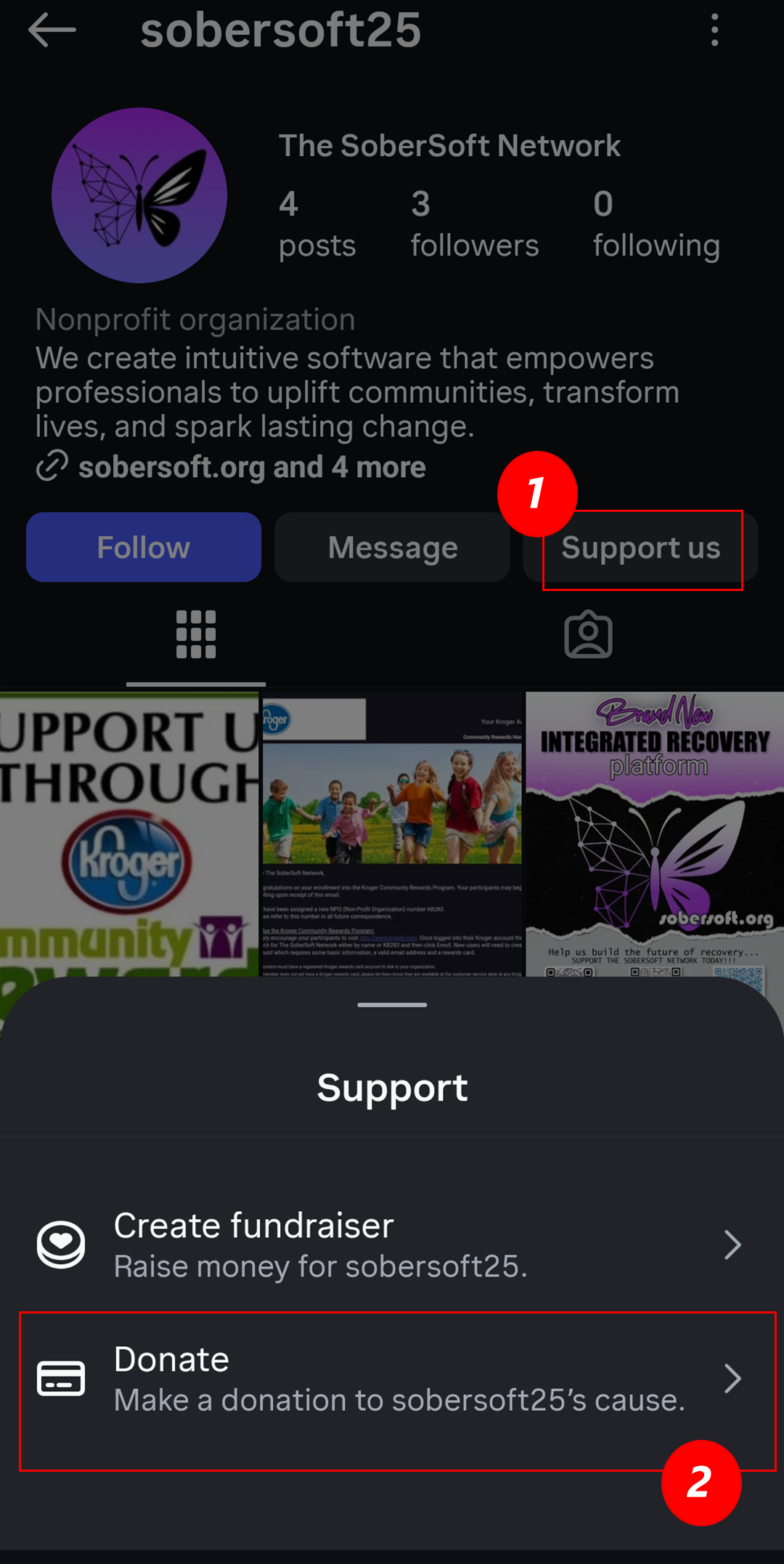
Our Instagram profile has a built-in Support us button. When someone taps it, they can choose to Donate directly to The SoberSoft Network or Create A Fundraiser to invite friends and family to give. This makes it easy for anyone to turn their Instagram presence into meaningful support. Please see the corresponding tabs for more specific instructions on how to Follow Us, Donate and Create A Fundraiser.
Open Our Profile
Go to our official Instagram account and look for the Support us button near the top of our profile, close to the Follow and Message buttons.
Choose “Donate”
Tapping Support us and selecting Donate lets supporters give directly to The SoberSoft Network using a card linked to Meta Pay in just a few taps. It’s a quick, secure way for individuals to make a personal contribution.
Choose "Create fundraiser"
Selecting Create fundraiser allows supporters to create their own Instagram fundraiser for us. They can share it with their followers, invite friends to give, and raise money on behalf of The SoberSoft Network.
#Nonprofit #Charity #GiveBack #MakeADifference #ChangeMakers #SocialImpact #CommunityFirst #DoGood #ActOfKindness #Volunteer MISSION-FOCUSED
#MentalHealthMatters #RecoverySupport #CommunityWellness #HopeAndHealing #EmpowerChange #SupportEachOther #EndTheStigma #SoberLiving #WellnessForAll #TogetherWeRise ENGAGEMENT & AWARENESS
#InspirationDaily #NonprofitLife #BeTheChange #TogetherWeCan #ImpactTheWorld #GoodVibesOnly #GiveHope #KindnessCounts #CommunityStrong #LeadershipForGood FUNDRAISING & DONOR-FOCUSED
#SupportOurMission #DonateNow #NonprofitFundraising #GivingTuesday #EveryDollarCounts #JoinTheCause #SponsorHope LOCATION-BASED
#CincinnatiNonprofit #OhioNonprofits #CincyStrong #CincinnatiCommunity #SupportLocal #OhioGives
Donate Instructions
Follow these quick steps to make a donation to The SoberSoft Network directly through Instagram using the Support us button on our profile.
-
Tap Support us
Go to our Instagram profile and tap the Support us button located next to the Follow and Message buttons. -
Choose Donate
In the Support menu that appears, tap Donate to make a one-time donation to The SoberSoft Network. -
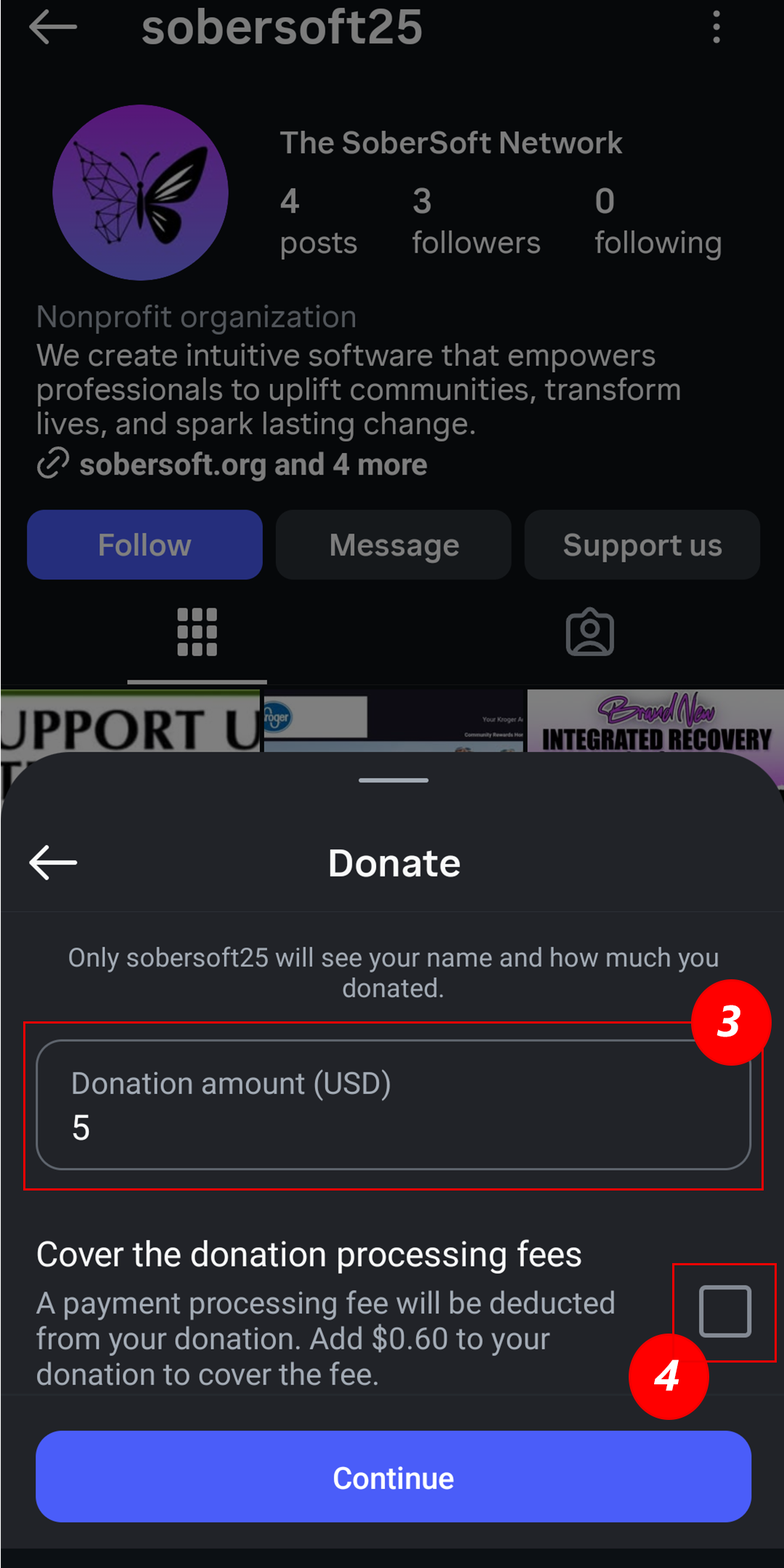
Enter your donation amount
On the Donate screen, type the amount you’d like to give in the Donation amount (USD) field. -
Optional: cover processing fees
Check the box if you’d like to add a little extra to help cover the processing fee so more of your gift goes to our work. -
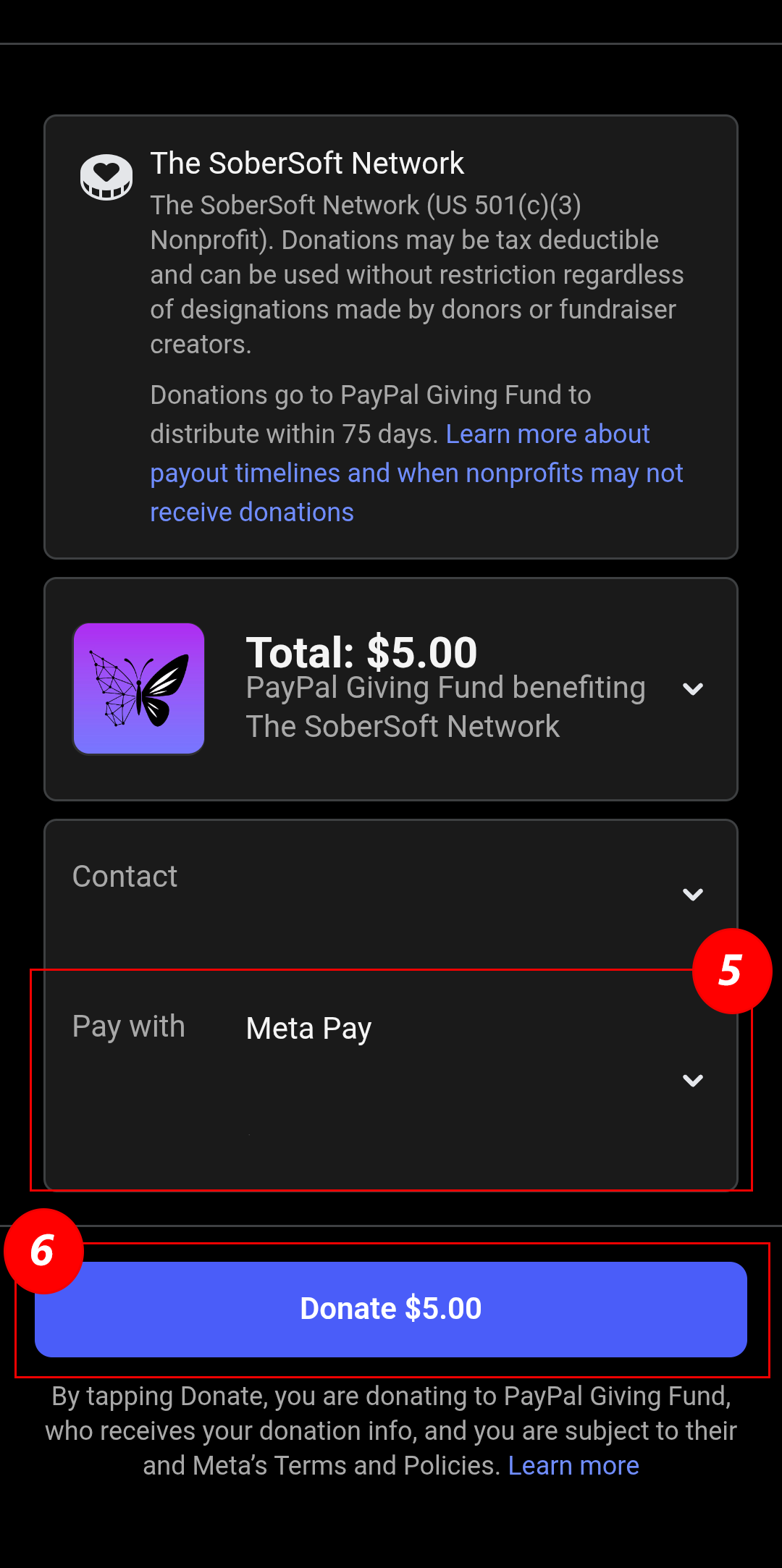
Confirm your payment method
Review the Pay with section (for example, Meta Pay) and confirm or update your payment method. -
Tap Donate to finish
When everything looks correct, tap the Donate button at the bottom to securely complete your donation. Thank you for supporting The SoberSoft Network!
Steps 1–2: Open Support & Choose Donate
Steps 3–4: Enter Amount & Cover Fees
Steps 5–6: Payment Method & Donate
Create Fundraiser Instructions
Supporters can raise money for The SoberSoft Network directly on Instagram using the Support us button on our profile. Follow the steps below to start your own fundraiser and share it with friends.
-
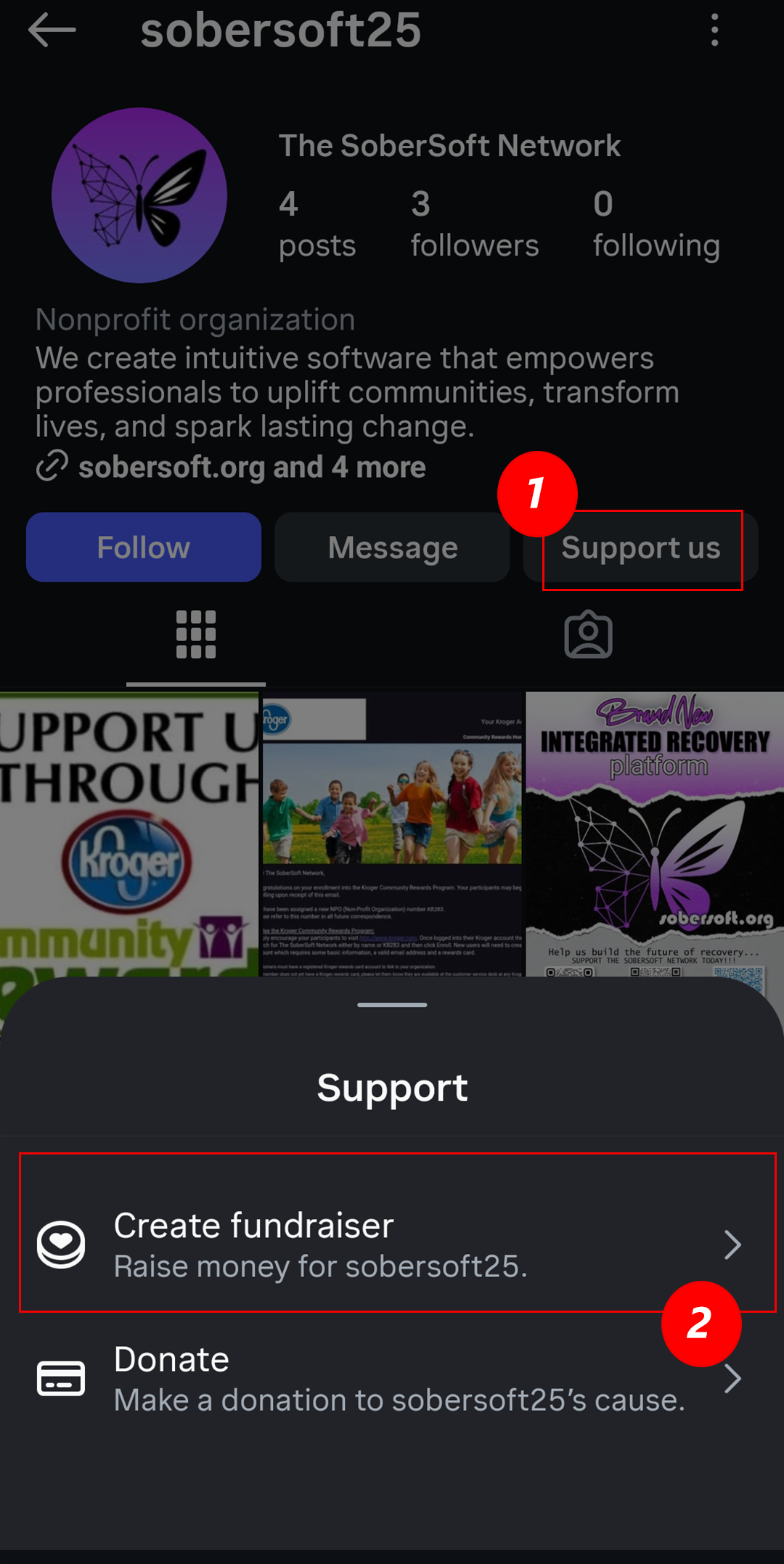
Tap Support us
Go to our Instagram profile and tap the Support us button located beside the Follow and Message buttons. -
Select Create fundraiser
In the Support menu, tap Create fundraiser to begin setting up your own Instagram fundraiser benefiting The SoberSoft Network. -
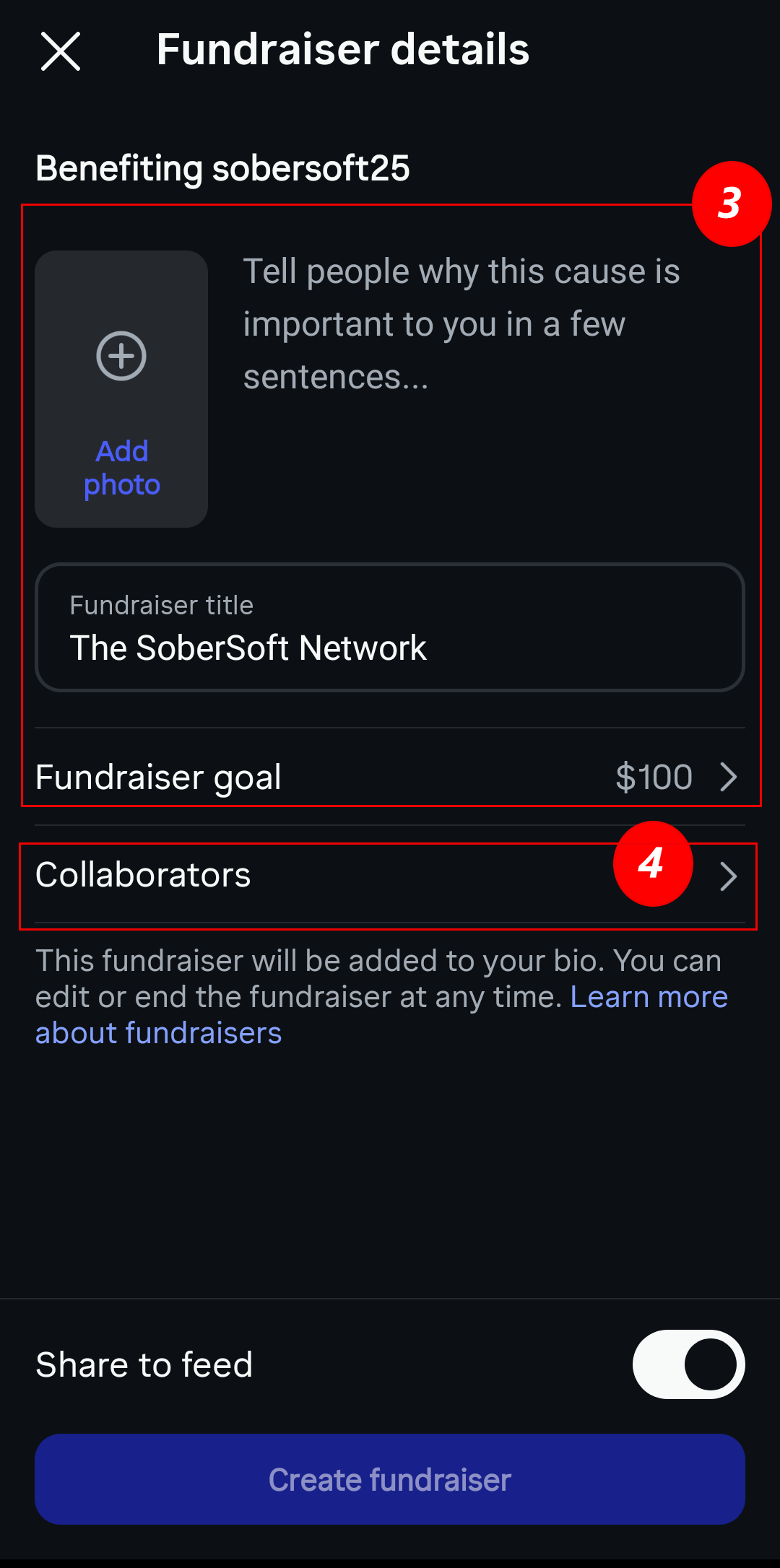
Add fundraiser details
• Optional: Add a photo for your fundraiser • Write a short message explaining why this cause matters to you • Confirm or edit the fundraiser title • Choose your Fundraiser goal amount -
Add collaborators
You may invite friends or family to help promote and share the fundraiser with their networks. This step is optional but helpful for increasing visibility. -
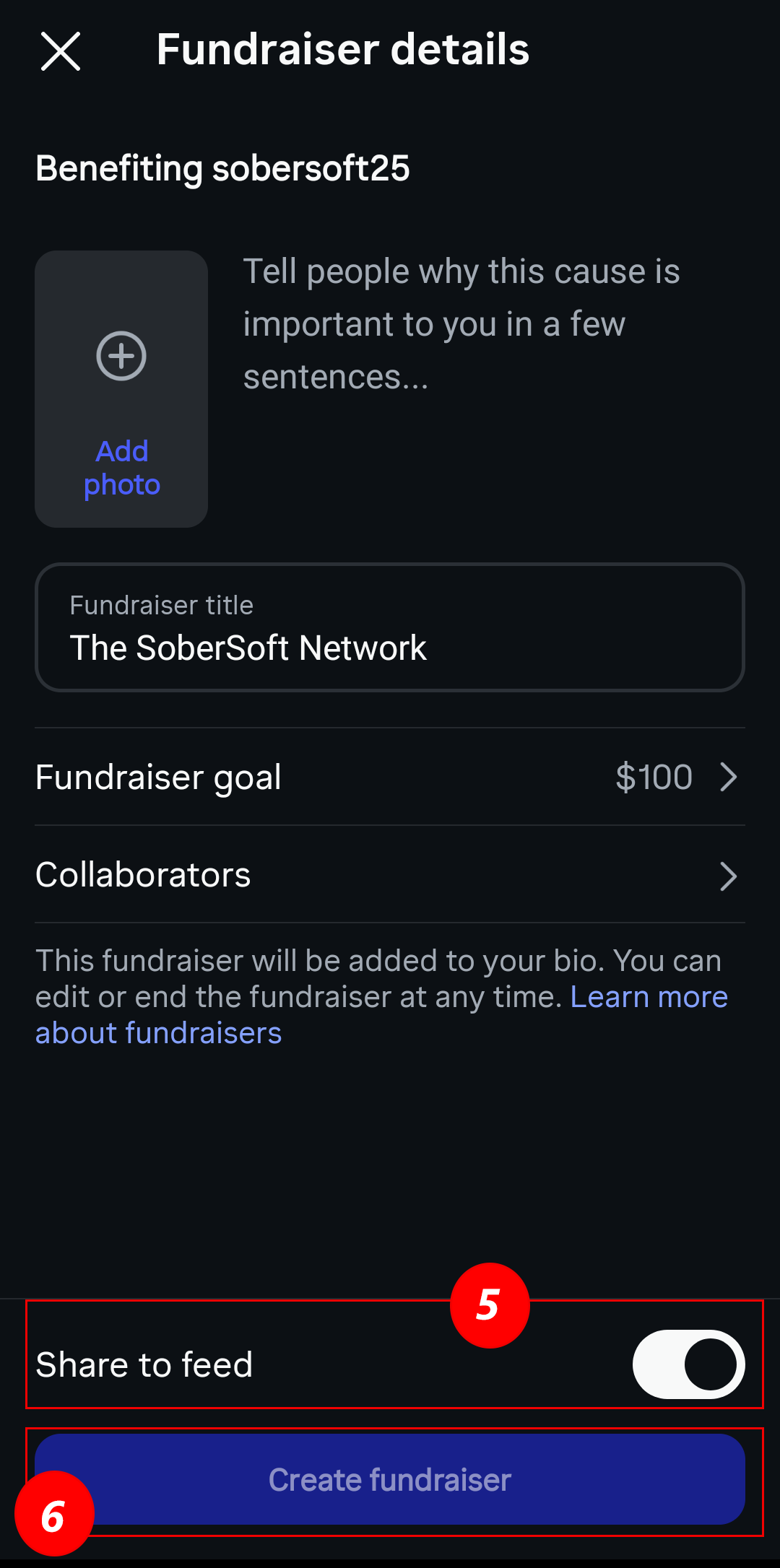
Choose whether to share the fundraiser to your feed
Turn the toggle on or off depending on whether you want the fundraiser to appear as a post on your Instagram feed immediately. -
Tap Create fundraiser
When everything looks good, tap Create fundraiser to launch it. It will be added to your profile bio automatically, and you can edit or end the fundraiser at any time.
Steps 1–2: Support Menu & Start Fundraiser
Steps 3–4: Add Details & Collaborators
Steps 5–6: Share & Create Fundraiser
#Nonprofit #Charity #GiveBack #MakeADifference #ChangeMakers #SocialImpact #CommunityFirst #DoGood #ActOfKindness #Volunteer MISSION-FOCUSED
#MentalHealthMatters #RecoverySupport #CommunityWellness #HopeAndHealing #EmpowerChange #SupportEachOther #EndTheStigma #SoberLiving #WellnessForAll #TogetherWeRise ENGAGEMENT & AWARENESS
#InspirationDaily #NonprofitLife #BeTheChange #TogetherWeCan #ImpactTheWorld #GoodVibesOnly #GiveHope #KindnessCounts #CommunityStrong #LeadershipForGood FUNDRAISING & DONOR-FOCUSED
#SupportOurMission #DonateNow #NonprofitFundraising #GivingTuesday #EveryDollarCounts #JoinTheCause #SponsorHope LOCATION-BASED
#CincinnatiNonprofit #OhioNonprofits #CincyStrong #CincinnatiCommunity #SupportLocal #OhioGives
How To Follow Us
Follow these steps to connect with us on Instagram:
- If you do not already have the Instagram app you can download for Android here or iOS here .
- Open the Instagram app and sign in or create an account.
- Tap the Search icon at the bottom and type our handle: @sobersoft25 .
- Tap our profile, then tap Follow.
- Optionally tap the bell icon on our profile and enable notifications for Posts, Stories, and Reels.
-
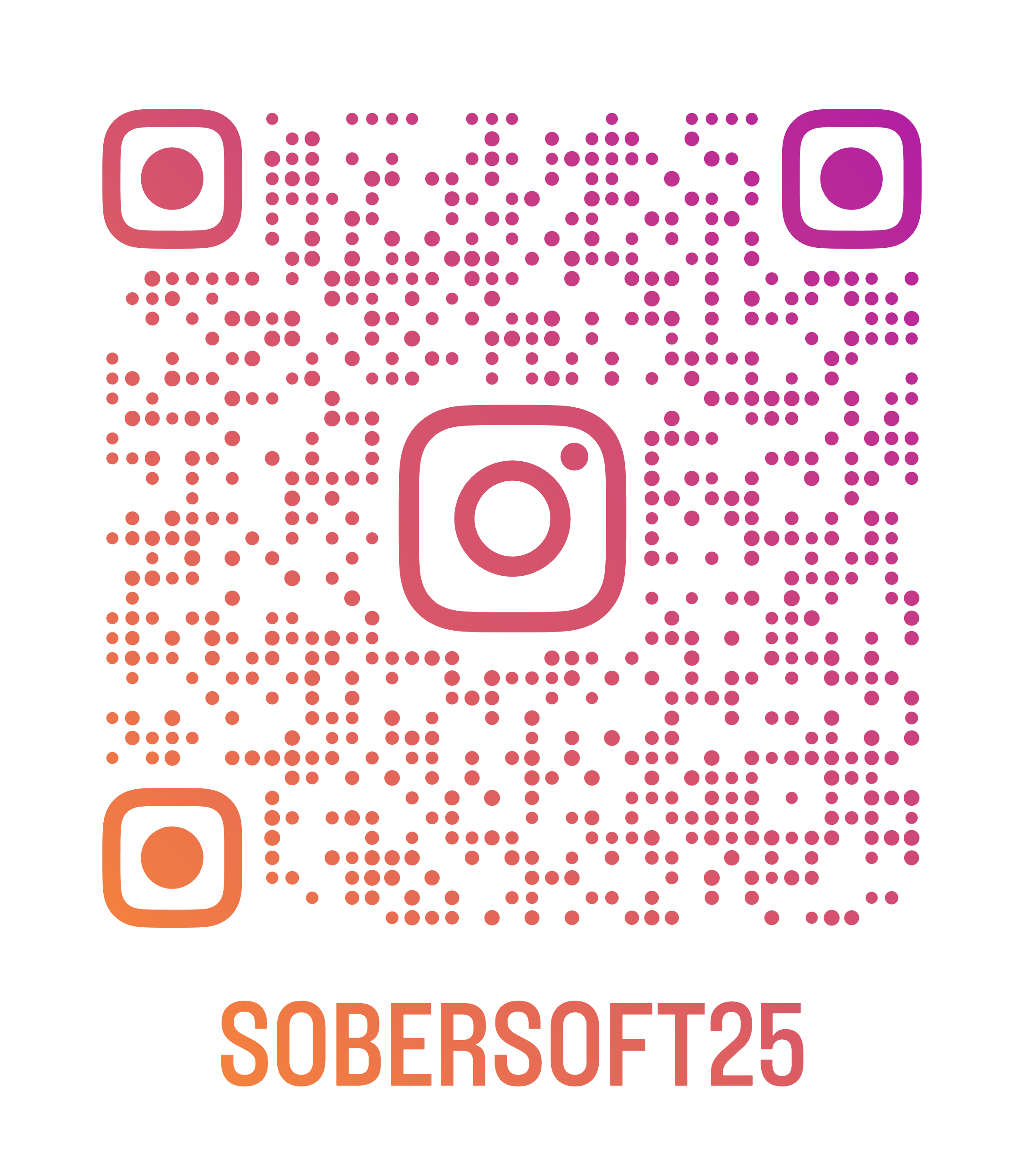
You can also use the following QR code. Thank you for your support!